 Banco Internacional
Rediseño del homepage institucional de un banco de desarrollo internacional. Encaré el proyecto de punta a punta: diagnóstico, arquitectura de información, sistema visual y prototipo funcional, entregando avances semanales durante 5 semanas.
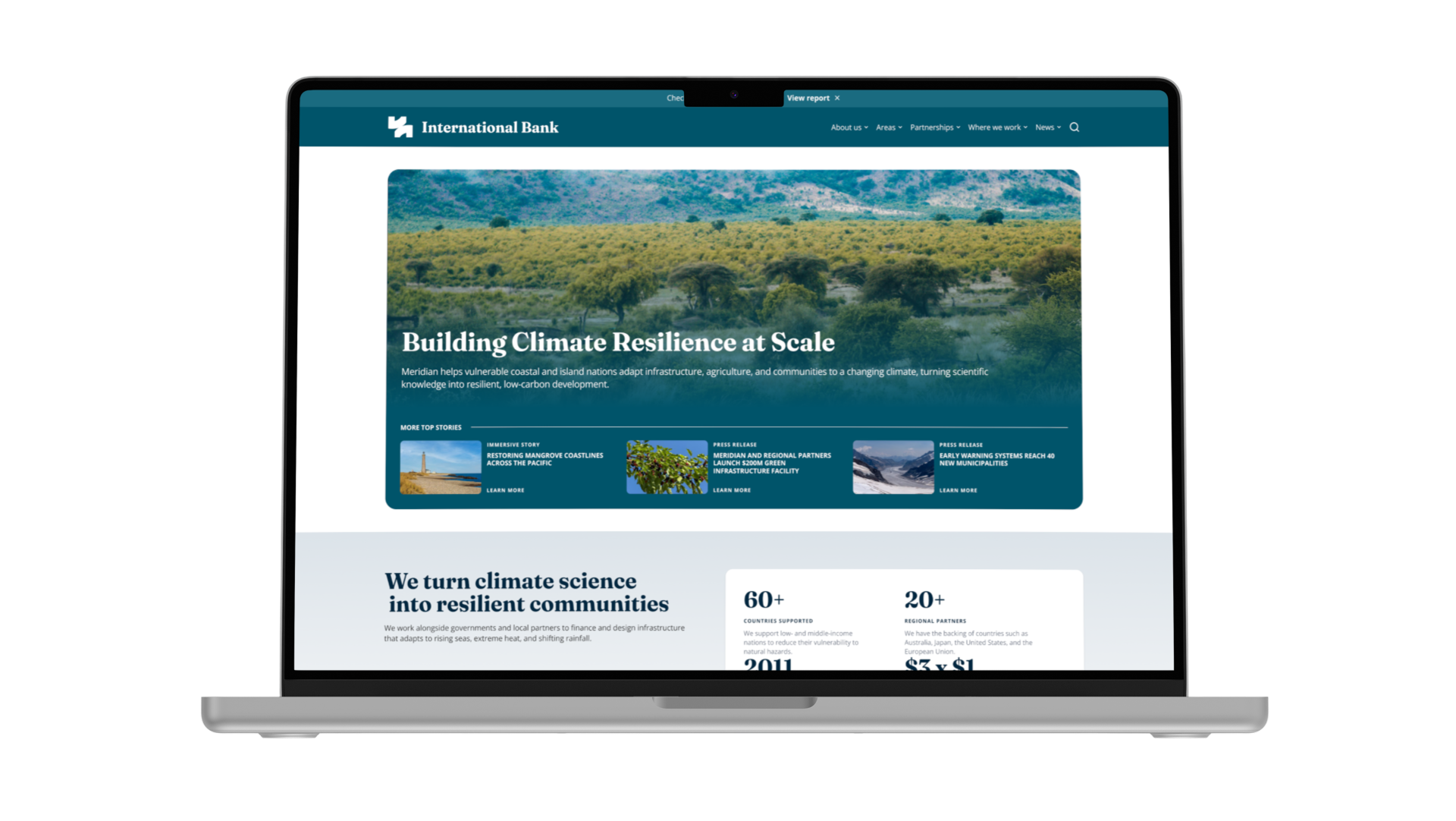


Por un acuerdo de confidencialidad con el cliente, no puedo nombrar la institución ni compartir capturas, links o cifras reales del sitio. Lo que sigue describe fielmente el proceso, el diagnóstico y las decisiones de diseño del proyecto, con los datos específicos generalizados.
Equipos de gobierno, organizaciones aliadas, investigadores y periodistas que buscan entender qué hace la institución.
El homepage original mostraba todo el contenido institucional al mismo tiempo, sin una jerarquía que guiara al usuario. En la Semana 1 (kickoff) diagnostiqué tres problemas concretos.
Cada sección tenía sus propios estilos y espaciados. La página no se leía como un solo producto.
Elementos mal agrupados y alineados. No quedaba claro qué iba junto ni qué era clickeable.
El contenido relacionado estaba repartido por la página, obligando al usuario a buscarlo.
El research fue principalmente una auditoría del sitio existente, ya que no había research cuantitativo previo disponible. Revisé el homepage sección por sección (header, grid de contenido destacado, sección institucional, noticias destacadas, áreas de trabajo, centro de conocimiento, testimonios, partners y footer) y mapeé cómo competía cada bloque por atención sin un orden de prioridad.
Además hice una prueba de usabilidad con unas 10 personas sin contexto previo: les mostraba la home y les preguntaba qué hacía la institución. Nadie lo entendió del todo a primera vista y solo 3 se acercaron al tema. Ese resultado marcó la primera prioridad del rediseño.
Tres decisiones para que la home reflejara qué hace la institución y cómo se organiza su contenido.
En una conversación con directivos me explicaron cómo se estructuraba el contenido: prioridades, áreas temáticas y publicaciones. Esa estructura no se traducía en páginas, y la home saltaba directo a las publicaciones sin pasar por las prioridades. Reordené la home para mostrar primero las áreas principales.
En la home anterior no se entendía qué hacía esta división en particular. Una de mis primeras decisiones fue explicarlo de forma explícita, con métricas en el hero y desarrollado en el primer módulo. Lo testeé con unas 10 personas sin contexto: les mostraba la página y les preguntaba qué hacía la institución. Con la home original nadie lo entendió del todo a primera vista y solo 3 se acercaron al tema. Con los cambios, 5 entendieron qué era y otras 3 acertaron el tema.
Algo que valía la pena destacar era el alcance global de la institución. Sumé un mapa interactivo con los países donde tiene influencia, para mostrar de un vistazo dónde trabaja.
Ordené los colores en dos niveles: una paleta base y variables semánticas que nombran el uso. Los componentes usan las semánticas, así cualquier cambio se hace en un solo lugar.
Cambios para que el usuario sepa siempre dónde está y cómo moverse por el sitio.
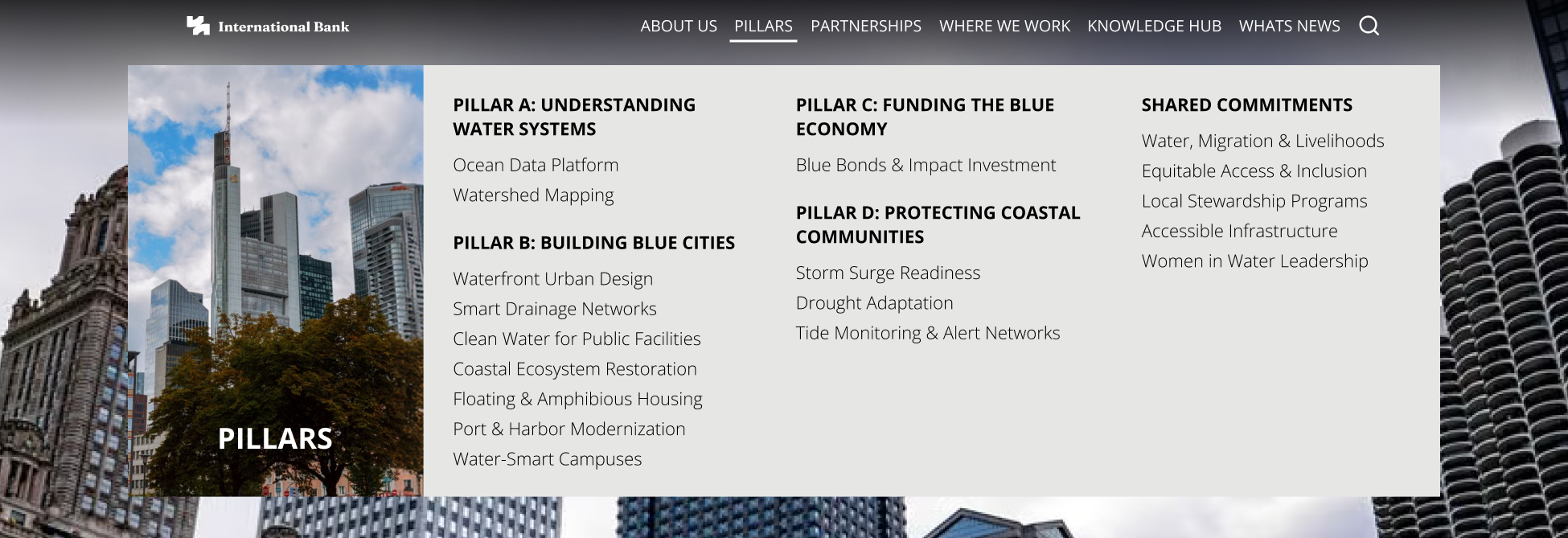
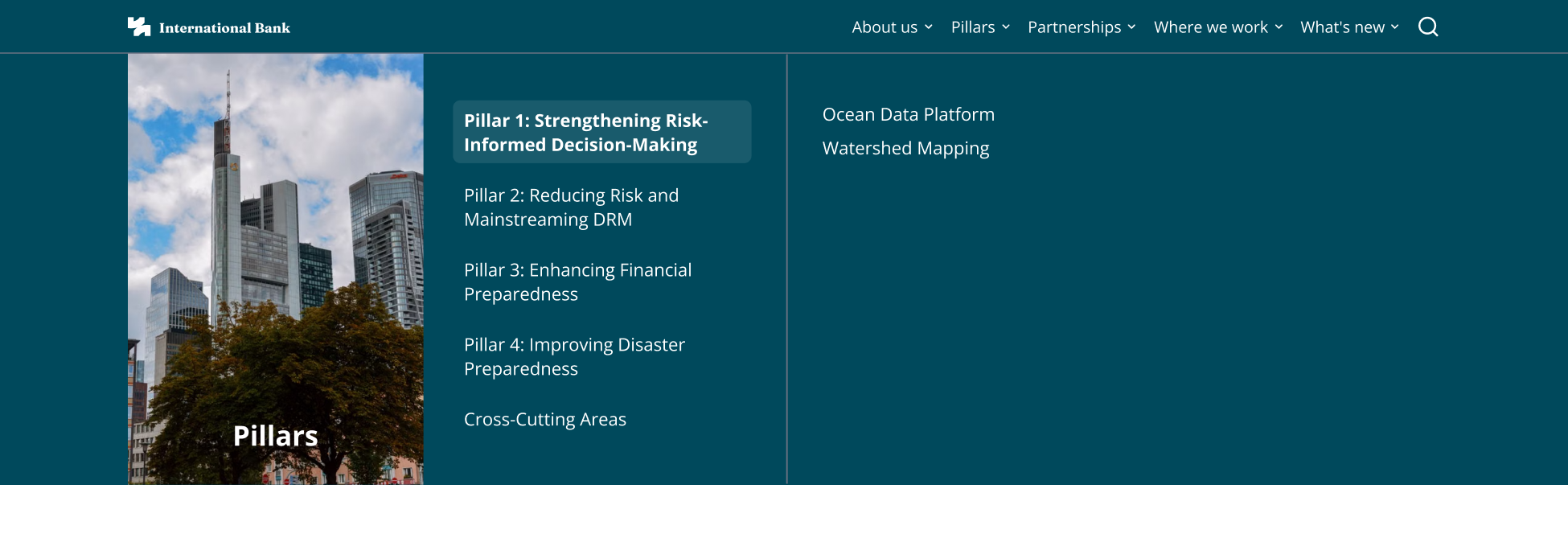
Rediseñé el header con el logo a mayor escala para darle a la institución presencia propia frente al banco, sin desprenderse de la marca madre ni de su marco institucional.
Sumé un breadcrumb para que el usuario sepa en qué nivel del sitio está y pueda volver atrás en un clic, y un navegador entre artículos para pasar al contenido anterior o siguiente sin volver al listado.
Del diagnóstico inicial a un sistema de componentes documentado, con entregas y revisiones de avance cada semana.
Diagnostiqué los problemas del sitio y definí la reestructuración de contenido bajo una lógica de biblioteca: así se lo expliqué a los directivos. Sus publicaciones son los libros, que se agrupan en secciones, y las secciones en áreas más grandes.
Bajé la arquitectura de información a nivel de página y presenté 4 propuestas de color por sección.
Cerramos la paleta, rediseñé el header y empecé a construir los primeros módulos en código.
Convertí los módulos sueltos en un sistema y sumé las secciones faltantes que detecté en la revisión.
Ajusté las reglas de imagen y componentes, y documenté todo para el equipo del cliente.
El rediseño fue aprobado por varios directivos de la institución y está en proceso de publicación. El equipo del cliente ya usa los módulos del sistema para replicar otras páginas del sitio.
Unos 30 componentes, desde botones e inputs hasta secciones enteras.
El sistema ya se aplicó a unas 20 pantallas, armadas con los mismos módulos y sin rediseñar desde cero.
El sitio no tenía ninguna medición. Ahora se registra por dónde navega el usuario y dónde hace clic, como base para las próximas mejoras.
A redesign of the institutional homepage for an international development bank. I ran the project end to end: diagnosis, information architecture, visual system and functional prototype, delivering progress weekly over 5 weeks.
Under a confidentiality agreement with the client, I can't name the institution or share real screenshots, links or figures from the site. What follows accurately describes the project's process, diagnosis and design decisions, with the specific details generalized.
Government teams, partner organizations, researchers and journalists looking to understand what the institution does.
The original homepage showed all the institutional content at once, with no hierarchy to guide the user. In Week 1 (kickoff) I diagnosed three concrete problems.
Each section had its own styles and spacing. The page didn't read as a single product.
Poorly grouped, misaligned elements. It wasn't clear what belonged together or what was clickable.
Related content was spread across the page, forcing users to hunt for it.
The research was mainly an audit of the existing site, since there was no prior quantitative research available. I went through the homepage section by section (header, featured-content grid, institutional section, featured news, work areas, knowledge hub, testimonials, partners and footer) and mapped how each block competed for attention with no order of priority.
I also ran a usability test with about 10 people with no prior context: I showed them the homepage and asked what the institution did. Nobody fully understood it at first glance and only 3 got close to the topic. That result set the redesign's first priority.
Three decisions so the homepage reflected what the institution does and how its content is organized.
In a conversation with directors, they explained how the content was structured: priorities, thematic areas and publications. That structure didn't translate into pages, and the homepage jumped straight to publications without going through the priorities. I reordered the homepage to show the main areas first.
On the old homepage it wasn't clear what this particular division did. One of my first decisions was to explain it explicitly, with metrics in the hero and expanded in the first module. I tested it with about 10 people with no prior context: I showed them the page and asked what the institution did. With the original homepage, nobody fully understood it at first glance and only 3 got close to the topic. With the changes, 5 understood what it was and another 3 got the topic right.
Something worth highlighting was the institution's global reach. I added an interactive map with the countries where it has influence, to show at a glance where it works.
I organized color in two levels: a base palette and semantic variables that name the use. Components use the semantic ones, so any change happens in one place.
Changes so users always know where they are and how to move around the site.
I redesigned the header with a larger-scale logo to give the institution its own presence apart from the bank, without breaking away from the parent brand or its institutional framework.
I added a breadcrumb so users know which level of the site they're on and can go back in one click, plus an article navigator to jump to the previous or next piece of content without returning to the listing.
From initial diagnosis to a documented component system, with deliveries and progress reviews every week.
I diagnosed the site's problems and defined the content restructuring around a library logic, which is how I explained it to the directors. Their publications are the books, grouped into sections, and the sections into larger areas.
I brought the information architecture down to page level and presented 4 color proposals per section.
We locked in the palette, I redesigned the header, and started building the first modules in code.
I turned the loose modules into a system and added the missing sections I spotted during review.
I fine-tuned the image and component rules, and documented everything for the client's team.
The redesign was approved by several of the institution's directors and is in the process of being published. The client's team already uses the system's modules to replicate other pages of the site.
Around 30 components, from buttons and inputs to entire sections.
The system has already been applied to about 20 screens, built from the same modules without redesigning from scratch.
The site had no measurement at all. It now tracks where users navigate and what they click, as the basis for future improvements.